
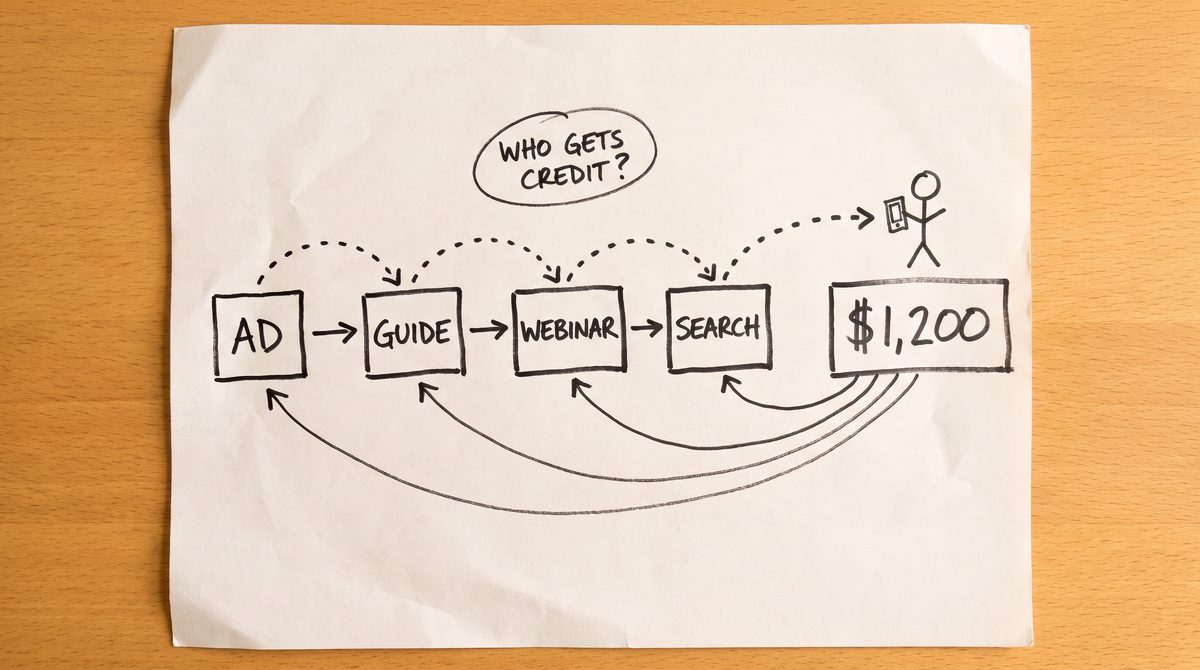
A learner clicks a social ad, reads a free guide, joins a webinar, clicks a search ad and then pays $1,200 on a phone call. Google Ads gives the sale to the search ad, the social platform claims it too, and the CRM shows a deal with no source. None of them says where next month’s budget should go.
Here is how multi touch attribution splits that one sale, and what to set up so the split counts revenue, not form fills.
Key takeaways
- Single touch models give 100% of a sale to one touch. Multi touch models split it.
- On one $1,200 sale with four touches, the same webinar earns $0, $120, $300 or $320, depending only on the model.
- GA4 removed the first click, linear, time decay and position based models in November 2023.
- If sales close by phone or in a CRM, store the Google Click ID (GCLID) with the lead, or no model sees the revenue.
What is multi touch attribution?
Multi touch attribution is a way to share the credit for one sale across every marketing touch that came before it, such as an ad click, an email or a webinar. Single touch models give all the credit to one touch, usually the first or the last. Multi touch models split it by a fixed rule.
| Model | How credit splits | Good for | Watch out for |
|---|---|---|---|
| First touch | 100% to the first touch | Seeing what brings new people in | Ignores what closed the deal |
| Last touch | 100% to the final touch | One visit purchases | Over credits brand search and retargeting |
| Linear | Equal share to every touch | Long paths where every step counts | Treats a 3 second view like a 1 hour webinar |
| Time decay | More credit the closer a touch is to the sale | Short sales cycles and promotions | Undervalues the ad that started it |
| U shaped (position based) | 40% first, 40% last, 20% shared by the middle | Lead gen, where the first visit and the form fill both matter | Middle touches get very little |
One sale, four touches: a worked example
Say a coding school sells a $1,200 course. Sam clicks a social video ad on day 1, reads the school’s free guide on day 6, joins a webinar on day 12, and clicks a search ad and books a call on day 20. On day 24 an advisor closes the sale by phone.
First touch gives all $1,200 to the social ad. Last touch gives it all to the search ad. The guide and the webinar get nothing either way.
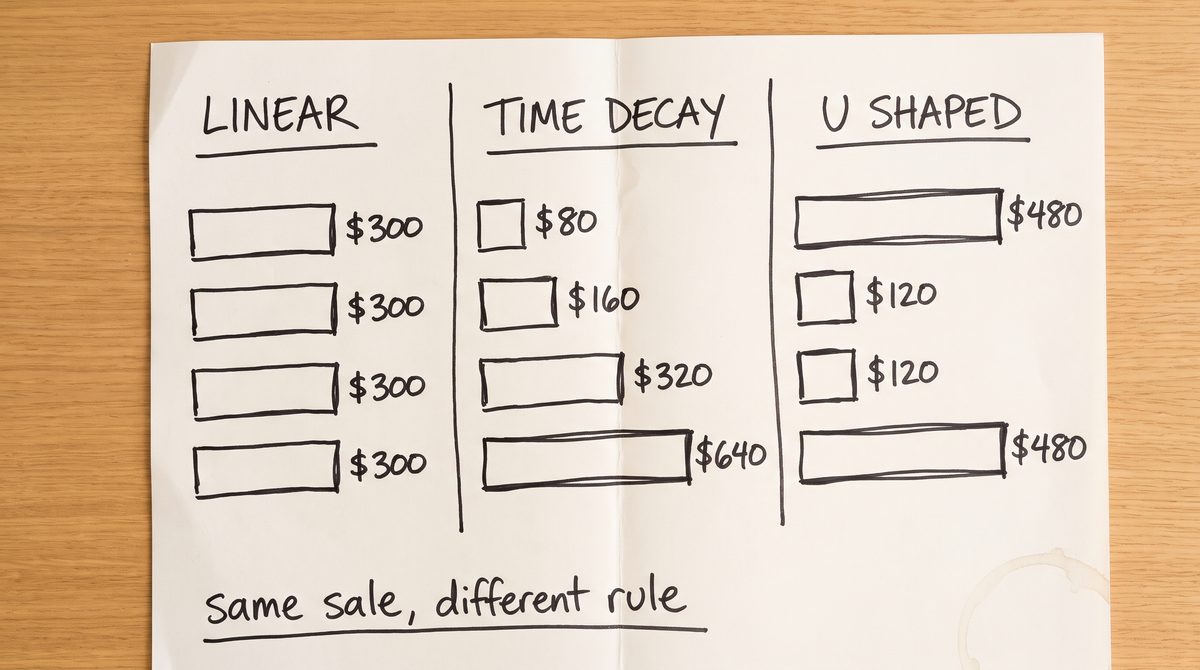
Linear divides by the number of touches: $1,200 divided by 4 is $300 each. Tools set their own time decay curves, so this lesson doubles the weight at each step: 1, 2, 4 and 8, which add up to 15, so one point is $80. U shaped gives $480 to the first and last touch and splits the other $240 across the middle.
| Touch | Linear | Time decay | U shaped |
|---|---|---|---|
| Social ad | $300 | $80 | $480 |
| Blog guide | $300 | $160 | $120 |
| Webinar | $300 | $320 | $120 |
| Search ad | $300 | $640 | $480 |
Every column adds up to $1,200. The webinar is worth $120, $300 or $320, and the webinar did not change. Only the rule did.
Try one yourself. A $2,100 deal has three touches: a search ad, an email and a call request form. Linear gives $700 each. Time decay with weights 1, 2 and 4 gives $300, $600 and $1,200. U shaped gives $840, $420 and $840, because the only middle touch takes the full 20%.
Why offline sales break every model
Sam paid on the phone, not on the website. Google Ads saw a click and a booked call, never the $1,200 in the CRM. If half the booked calls never pay, every model above is splitting credit for leads, not revenue.
Google Ads Help calls the fix offline conversion import. Each ad click gets a Google Click ID (GCLID). Capture it in a hidden form field, save it on the CRM record, and upload it when the deal closes. The file needs a Google Click ID column, a Conversion Name that matches your conversion action exactly, capital letters included, and a Conversion Time. Conversion Value is optional, but a blank value falls back to the action’s default, so the real deal size is lost. Wait 4 to 6 hours after creating a new conversion action before the first upload.
One platform is manageable by hand. Three at once usually is not. This is where a multi touch attribution platform helps, because it joins ads, website visits and CRM deals on one record. ObserviX is one example of a marketing attribution platform that connects ad platforms, website and CRM and sends verified conversions back to the ad platforms.
How to check your attribution setup this week
1. Write down the model behind each report
Google Analytics Help lists three models left in GA4: data driven, paid and organic last click, and Google paid channels last click. First click, linear, time decay and position based were removed in November 2023, so a linear number came from another tool.
2. Compare the conversion window to your sales cycle
Google Ads uses a 30 day click through window by default, with up to 90 days for Search and Display depending on the source. If deals take 45 days to close and the window is 30, the first click gets no credit.
3. Test the GCLID field yourself
Click your own ad, fill in the form, then open the lead in the CRM. If the GCLID field is empty, no sale from that form can be matched.
4. Reconcile one month of revenue
Compare last month’s closed won revenue in the CRM with the conversion value your ad platforms report. Much higher in the ads means leads counted as sales or two platforms claiming one deal. Much lower means offline sales are missing.
5. Compare two models before cutting a channel
A channel that is weak under last touch but strong under linear is starting deals that others finish. Cut it only if it is weak under both.
Common questions
What is the difference between single touch and multi touch attribution?
Single touch gives the whole sale to one touch, first or last. Multi touch shares it across several touches by a rule, such as equal shares or 40/20/40.
Which multi touch attribution model should I use?
If most customers buy in one visit, last touch is close enough. For lead gen and B2B, start with U shaped and use linear as a second view.
A good first step: take your last ten closed deals from the CRM, list the tracked touches for each, and run the linear and U shaped math by hand. If most deals have no touches, fix the GCLID capture before choosing a model.